Are you facing trouble paying for your NSW vehicle registration renewal? Don’t worry the process has evolved, now you can “pay rego online” from the comfort of your home. No need to go to the service centre and stand in long queues. Just a quick solution to a tiresome inconvenience.
Thanks to the changes in Service NSW’s online systems, most vehicle owners can now complete their rego in just a few minutes.This guide will help you get your vehicle registration renewed. The guide will cover everything from the eligibility requirements to how to perform a NSW rego check to pay for renewal.
Things to remember when paying Rego Online:
In order to pay rego during a NSW rego check, make sure you meet the following criteria otherwise you will not be eligible for it.
You will need to visit the service centre, if:
- You have ordered special number plates but you don’t have them, you cannot pay for renewal online.
- Vehicles registered under the CED (Common Expiry Date) scheme need in-person renewal.
- You must re-register your car in-person, if your car has been unregistered for more than 3 months.
- The car has conditional registration and needs inspection. As inspection is mandatory, online renewal is not possible.
- Under conditional registration, your car’s operational conditions have changed.
- Any vehicle modifications affecting road safety, needs to be reviewed at a service centre before renewing and paying rego online.
Requirements before you Pay Rego Online
Before you begin your car’s registration renewal process, make sure the following steps are completed:
- Up to date CTP (Green Slip) Insurance
CTP (Compulsory Third Party) insurance policy, also known as Green Slip. It must be purchased from a licensed insurer beforehand to complete the registration process. Insurers then automatically send policy details to Transport for NSW, enabling the renewal to appear in the online system. It should also match your registration period.
- Vehicle Safety Check (eSafety Check)
If your car is more than 5 years old, you must undergo an eSafety inspection and get an eSafety check report also known as a Pink Slip before registering in NSW. Once results are uploaded electronically, the renewal process begins.
- NSW Rego Check
It is advised to get a check before proceeding with your renewal through Service NSW. Free check verifies registration status, confirms inspection dates, and ensures information on your renewal notice is correct. It also lets you check whether there are any other issues like overdue inspections or incorrect vehicle details.
- Valid Payment Method
Make sure you know all payment information and concession information before completing your rego online payment. Though Service NSW accepts most major payment methods, including credit, debit, BPAY or online (PayPal).
How to Pay Rego Online NSW in 2026: Step-by-Step Process
Once you confirm your eligibility for a rego check, the after process is quick and stress-free.
Follow these steps to complete it smoothly:
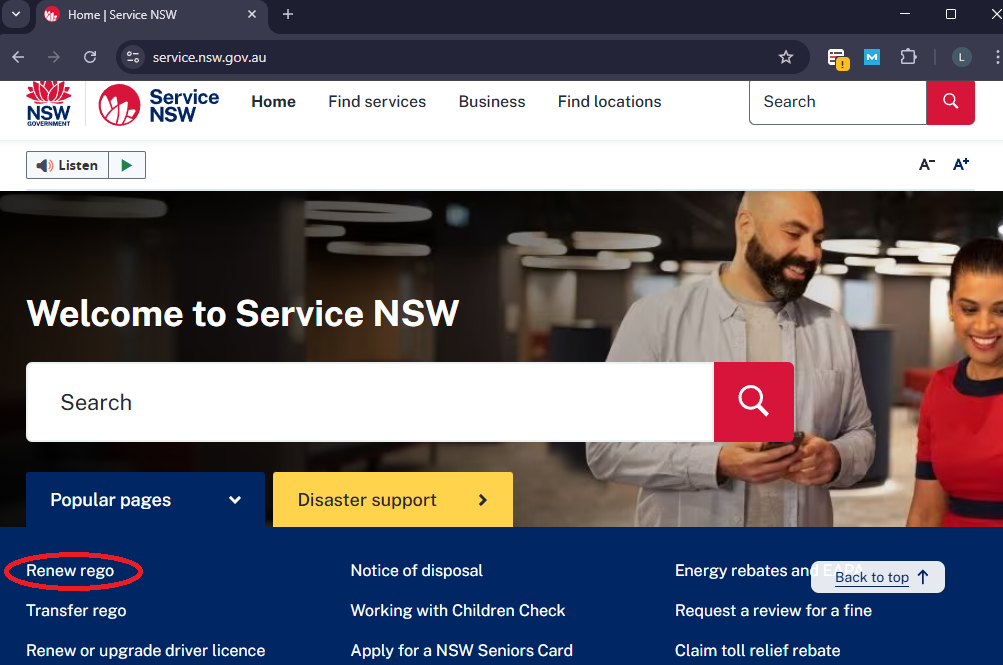
Step 1: Visit the Official Service NSW Website
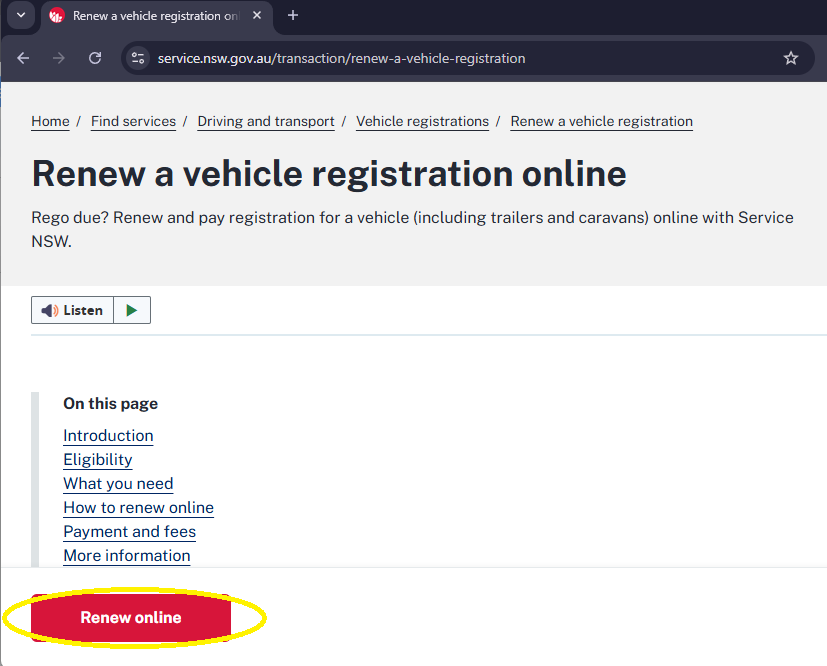
After you have opened the portal, go to the Renew rego section. A Renew a Vehicle Registration Online will open up. Go to the bottom of the page and click on the Renew Online option.
Step 2: Enter Vehicle Details promptly
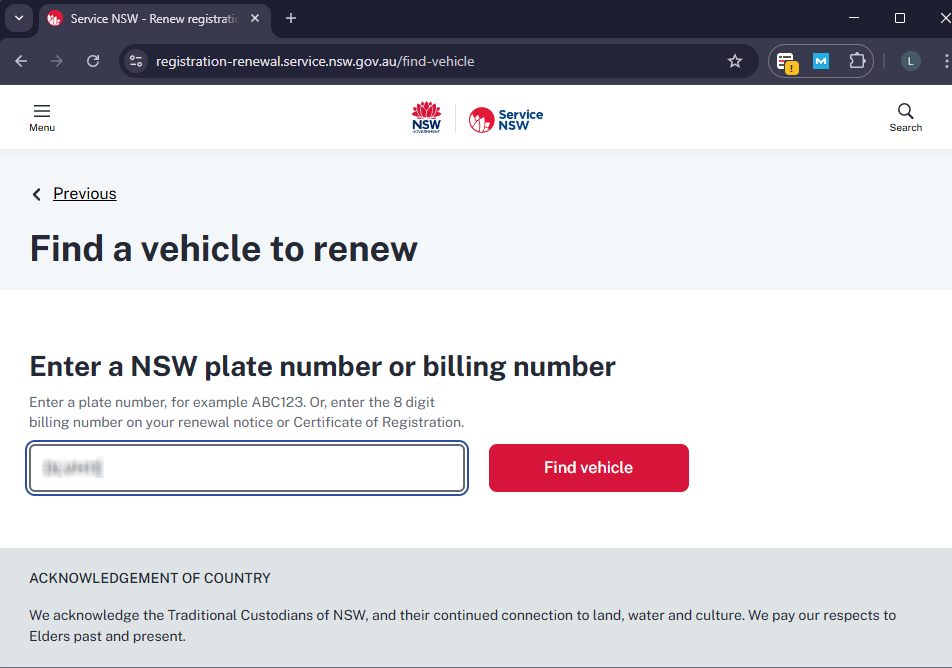
After clicking on the Renew Online option, you will be redirected to a page where you will enter your vehicle NSW plate number or billing number on your renewal notice.
Step 3: Complete Payment
Once the car details are filled, follow the prompts, and make payment to complete your renew rego online process. After the payment is completed you will receive a confirmation receipt via email.
NOTE: Keep the receipt as it is the proof of payment and for record keeping.
Step 4: Verify Confirmation
After completing all the steps, revisit the Service NSW website to verify if your registration has been updated. Although updates are instant, sometimes delays can occur.
Renewing Rego for Vehicles No Longer in Use
If your car is no longer in use, renewing registration may not be needed. Many car owners turn to licensed car removal services for disposal of unwanted or damaged vehicles.
Before arranging car removal, make sure to cancel your car’s registration through the appropriate Service NSW process and surrender the number plates. You may also get refunded for unused registration.
Additional Information
To avoid any delays and to ensure a smooth renewal process. Kindly consider the following:
- Complete your eSafety inspection a few days prior to the registration expiring.
- Get confirmation for your Green Slip transmission policy.
- Use NSW rego check on the official Service NSW website before paying to check for renewal eligibility.
- Update your contact information for annual renewal reminders with Transport for NSW.
Conclusion
In 2026, paying rego online NSW is a simple and efficient process for most car owners. With digital systems from Service NSW, car owners can renew their vehicle registration from home without visiting a service centre. As long as your CTP (Green Slip) is valid, eSafety inspection is complete, and your vehicle meets eligibility criteria, the online renewal process becomes easy.
By following this guide, you can complete a NSW rego check, understand when online renewal is permitted, and you can renew your rego on time. It helps you maintain CTP insurance and stay compliant with NSW laws, making registration stress free. And if you want to get rid of your scrap car, you can contact Scraply. They will tow away your car for free and give you top cash for cars offers Sydney wide.
FAQs
Q1. Do you have to pay rego online?
Ans. Yes, you can pay for renewing registration online, if you meet all requirements.
Q2. How to Check rego NSW?
Ans. You can check registration, by visiting the official Website Service NSW.
Q3. Is rego check NSW free?
Ans. Yes, you can check your registration status for free, by visiting the official website Service NSW.
Q4. How do I pay for rego renewal NSW?
Ans. You can pay for rego renewal online on the Service NSW website, in-person by visiting a service centre, on the phone or by post.